Configure your Rinho devices the way you work
By hand, with our assistant, or from the AI you already use.
The configurator and the skills are free, with nothing to install to get started.
Three ways to work with the device
For technicians and installers
Web configurator
Section-by-section forms, validation before sending, and USB upload straight from the browser. No software to install.
Open the configuratorFor those who do not know the commands
Assistant inside the configurator
Ask for what you need in plain language: it builds the configuration, explains an existing one and tells you what is missing for it to work.
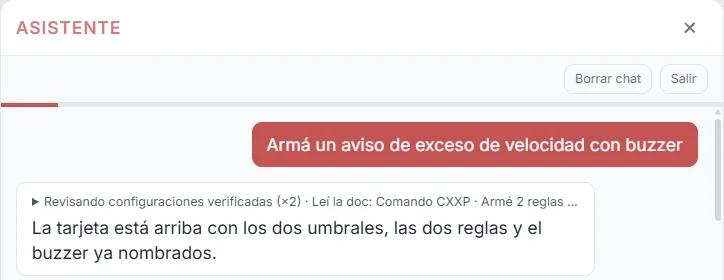
For Rinho customers · access on request
Request accessFor integrators and engineering teams
Your own AI
Official skills for Claude Code, Codex, Cursor, Gemini CLI and Claude.ai. Your agent builds, validates and uploads the configuration without leaving your workflow.
See the skillsFrom a request to a configured device
An example with the rinho-config skill. The lines come from a tested recipe and pass the configurator validation.
› Sound the buzzer if the vehicle goes over 110 km/h
Using the "Overspeed with buzzer" recipe
>SVL00E01101<
>SVL01E01001<
>SRL16E;TRG=VL00+;ACC={GER53H;@LOG}{SSSXP0111}<
>SRL17E;TRG=VL01-;CND=XP01;ACC={GER54H;@LOG}{SSSXP0100}<
✓ 4 of 4 lines validated with the configurator engine (Spider IoT)
! If your firmware does not support a feature, it tells you before sending it
› Upload it to the device on COM4
✓ Backup saved · 4 lines sent · OK
Three skills, each for a specific job
Available for Zero IoT, Spider IoT and Smart IoT.
rinho-config
Builds rules, alarms, outputs, reports and low-power modes from 31 tested recipes. Validates every line and flags what your firmware does not support.
rinho-diagnostics
Guides device diagnostics with read-only queries: why it is not reporting, what is configured and what is missing.
rinho-zones
Turns a KML, KMZ or CSV into the device zones file, explains how to publish and load it, and builds the zone entry and exit rules.
One-line install
npx skills add fernandorvs/rinho-skillsSafeguards built in
- Validates every line with the same engine as the configurator before handing it over.
- Backs up the current device configuration before changing it.
- Sends line by line and stops at the first error.
- Asks for explicit confirmation before driving outputs or running sensitive commands.
- Only uses the serial port you name.
- Masks APN, passwords and credentials in what it shows and logs.
Frequently asked questions
Building your own platform?
Open-protocol hardware, public documentation and tools that let your AI work with the device. You decide which server it reports to.