Back to blog
Tutorial, Tools, Geofences, Platforms, Fleet Management, Rinho Telematics
ES • EN • PT
Region Creator Tool for Platforms
We are pleased to introduce our Region Creator tool, a free utility that allows you to create and export geographic regions in formats compatible with major tracking platforms.
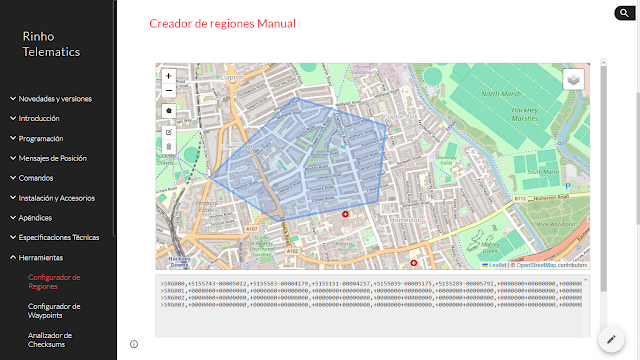
What is the Region Creator?
The Region Creator is an online tool that allows you to:
- Draw polygons on an interactive map
- Export in WKT format (Well-Known Text)
- Generate compatible files for platforms like RedGPS, Wialon, Traccar, and more
- Save and share your regions easily
How to Use It
- Access the tool: Region Configurator
- Navigate the map to the area of interest
- Draw the polygon by clicking on the map points
- Close the polygon by clicking on the starting point
- Export in your desired format
Common Use Cases
Geofences
Create restriction zones or areas of interest for your fleets:
- Industrial zones
- Distribution areas
- Prohibited areas
- Loading/unloading zones
Complex Regions
The tool allows you to create:
- Simple polygons
- Multi-part regions
- Irregular areas
Compatibility
The exported files are compatible with:
| Platform | Format |
|---|---|
| RedGPS | WKT |
| Wialon | WKT/JSON |
| Traccar | GeoJSON |
| Google Earth | KML |
Advantages
- ✅ Free: No cost to use
- ✅ No registration: Use immediately without creating an account
- ✅ Easy to use: Intuitive interface
- ✅ Multi-format: Export to multiple formats
- ✅ Precise: High geographic precision
Access the Tool
Do you have questions or suggestions? Contact us.